Deploy to your cloud
There are two separate deploys. pal deploy ships an agent to a running control plane, in seconds, as often as you change the agent. Helm or Terraform puts the platform in your cloud, once. For a gated rollout through sandbox, staging and prod, with a human approving prod, use Promotion instead of a bare pal deploy.
What you get at the end: the dashboard on your own app host, the API on your own API host, a first owner account, and the CLI signed in to it.
Ship an agent
Section titled “Ship an agent”From the agent’s directory, against any control plane you are signed in to:
pal deploy --dry-run # one read-only lookup: reports "create" or "update", changes nothingpal deploy --jsonpal deploy reads agent.yaml (name, description, model, system_prompt, labels, workflow), creates or updates the agent, saves the workflow graph, then calls POST /v1/agents/{name}/deploy. The response carries "status": "live" and the agent’s invoke URL.
| Exit code | Meaning |
|---|---|
3 |
Unauthorized |
4 |
Quota or budget (402) |
5 |
Not found |
6 |
Server error |
Put the platform in your cloud
Section titled “Put the platform in your cloud”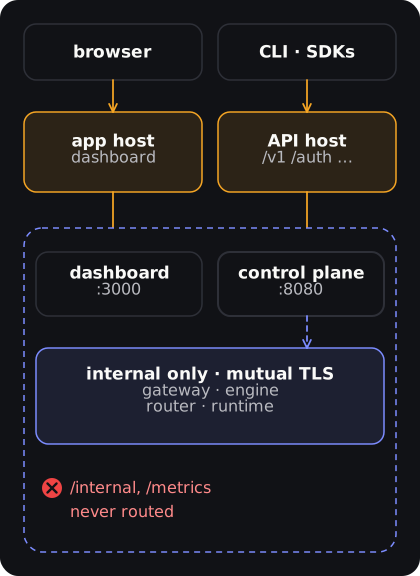
You need: a Kubernetes cluster whose CNI enforces NetworkPolicy (Calico, Cilium), cert-manager (the chart issues every internal mTLS certificate with it), an ingress controller, managed Postgres with pgvector, and an S3 bucket.
-
Generate the secrets into a file you keep out of git. Each one stops a pod, with its name in the log, if it is missing in production. You pass this same file again on every upgrade.
Terminal window umask 077cat > pal-secrets.yaml <<EOFsecrets:jwtSecret: "$(openssl rand -hex 32)"credentialKey: "$(openssl rand -hex 32)"receiptSecret: "$(openssl rand -hex 32)"callbackSigningSecret: "$(openssl rand -hex 32)"grpcServiceToken: "$(openssl rand -hex 32)"schedulerNodeToken: "$(openssl rand -hex 32)"appDbPassword: "$(openssl rand -hex 32)"postgresPassword: "<your managed Postgres password>"minioPassword: "<your S3 secret access key>"EOFcallbackSigningSecretsigns run and batch callbacks.appDbPasswordis for the restrictedpal_approle that row-level security applies to: create the role withinfra/db/least-privilege.sql, then set the same password on it (ALTER ROLE pal_app PASSWORD '…'). -
Write your values. Save this as
my-values.yamland replace the hosts, store addresses and the ingress controller’s pod CIDR and namespace.my-values.yaml externalDatabase:host: pal-db.example.internal # Postgres with pgvectorexternalS3:endpoint: https://s3.us-east-1.amazonaws.comregion: us-east-1accessKeyId: <access key id> # the secret key is in pal-secrets.yamlbucket: <your bucket>ingress:enabled: truehosts:- host: api.example.compaths:- {path: /v1, pathType: Prefix, service: control-plane}- {path: /auth, pathType: Prefix, service: control-plane}- {path: /.well-known, pathType: Prefix, service: control-plane}- {path: /mcp, pathType: Prefix, service: control-plane}- {path: /dl, pathType: Prefix, service: control-plane}- host: app.example.compaths:- {path: /, pathType: Prefix, service: dashboard}tls:- hosts: [api.example.com, app.example.com]secretName: pal-tlscontrolPlane:trustedProxies: "10.0.0.0/8" # your ingress controller's pod CIDRenv:PAL_BOOTSTRAP_OWNER_EMAIL: you@example.comnetworkPolicy:ingressFrom:- namespaceSelector:matchLabels:kubernetes.io/metadata.name: ingress-nginxWhy each line is there:
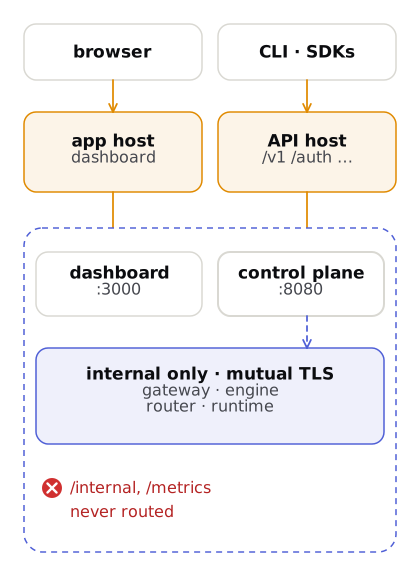
- Two hosts. The dashboard’s pages and the API share paths such as
/auth/reset, so they cannot share one origin. Do not point the API host at the gateway: it serves only/v1/agentsand/v1/runs./internaland/metricsare never routed. trustedProxiesandingressFromare required. The chart refuses to render without them when ingress is on: the first is how the sign-in rate limiter finds the real client IP, the second keeps other namespaces off the control plane’s port.tls. The chart derivesPAL_PUBLIC_BASE_URL,OAUTH_REDIRECT_BASE,OAUTH_DASHBOARD_URL,PAL_DASHBOARD_URLand the dashboard’s API URL from these hosts, and useshttps://only for hosts listed undertls.PAL_BOOTSTRAP_OWNER_EMAIL. Sign-up is closed in production and there are no users yet; this creates the first owner.
- Two hosts. The dashboard’s pages and the API share paths such as
-
Install.
Terminal window helm dependency build ./infra/helm/pal # the Redis subcharthelm install pal ./infra/helm/pal --namespace pal --create-namespace \-f infra/helm/pal/values-prod.yaml -f my-values.yaml -f pal-secrets.yamlvalues-prod.yamlsetsPAL_ENV=production, so every production startup guard is on. Check it worked:kubectl -n pal get podsshows every podRunningandcurl -s https://api.example.com/auth/providersreturns JSON. -
Sign in as the first owner. The control plane prints a one-time password link, valid for one hour, once:
Terminal window kubectl -n pal logs deploy/pal-control-plane | grep -A2 "first-owner bootstrap"Open the link, set your password, then sign in at
https://app.example.com. For Google sign-in, registerhttps://api.example.com/auth/oauth/google/callback. More in Accounts and teams. -
Point the CLI at it. Without
--rest,--api-urlis a gRPC address. SetPAL_API_URLandPAL_USE_REST=1to make it permanent.Terminal window pal --rest --api-url https://api.example.com login
This all-in-one chart suits a single cluster. To keep agent data in a separate VPC, install infra/helm/pal-control-plane here and a data plane per cloud (next tab). Every value, the store choices and backups: Production deployment.
Generate a data plane for EKS, GKE or AKS. Agents then execute in that cloud while the control plane schedules them. pal infra install only writes Terraform; you apply it.
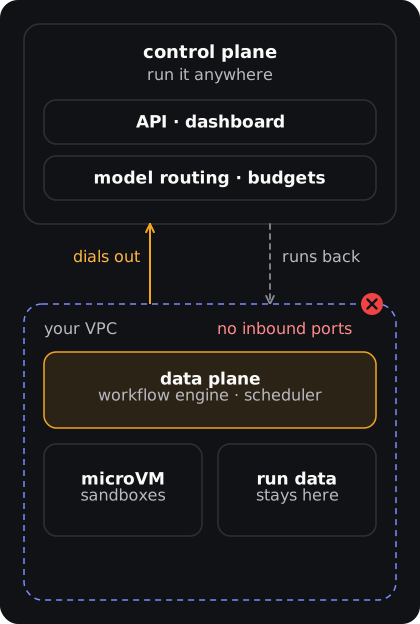
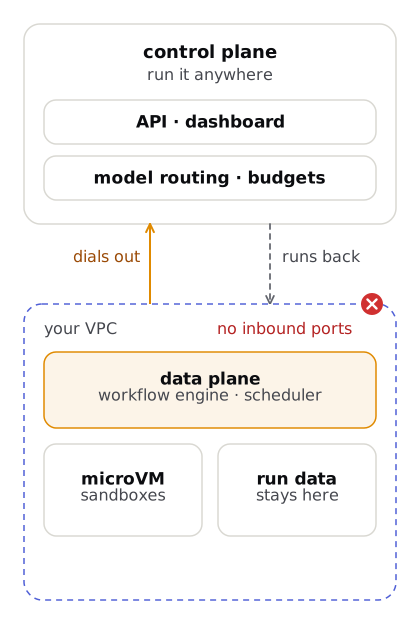
pal infra install --cloud aws --region us-east-1 --node-count 3 --firecracker \ --tenant-id <your tenant id> --control-plane-endpoint https://<your control plane host>export TF_VAR_agent_token="<one-time token from Deployments, Register data plane>"cd pal-data-plane-aws && terraform init && terraform plan && terraform apply--tenant-id (or PAL_TENANT_ID) and --control-plane-endpoint are required. The data plane dials out to the control plane’s :50051 over TLS with a one-time bootstrap token, so you open no inbound ports. Get the token under Deployments, Register data plane or with POST /v1/data-planes. pal infra status is a placeholder today; check the data-plane-agent pod logs, and see Production deployment for the heartbeat check.
Which topology
Section titled “Which topology”| Topology | Control plane | Data plane | When |
|---|---|---|---|
| Hybrid (recommended) | One place | Each workload’s cloud | Production; agent data stays in your VPC |
| Fully self-hosted | Your cluster | Your cluster | Full control; you run Postgres, Redis and Kubernetes |
| Fully managed | Not offered | Not offered | Not available yet |
Next: Production deployment for production settings, NetworkPolicy, backups and migrations. Every variable a production process requires: Environment variables. Shape of the split: Deployment topology.