Agents
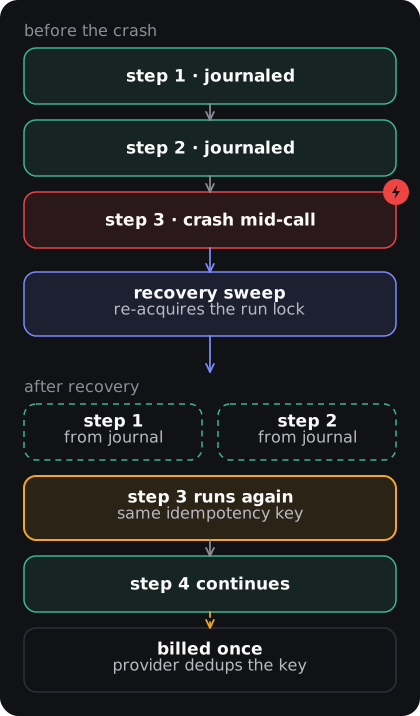
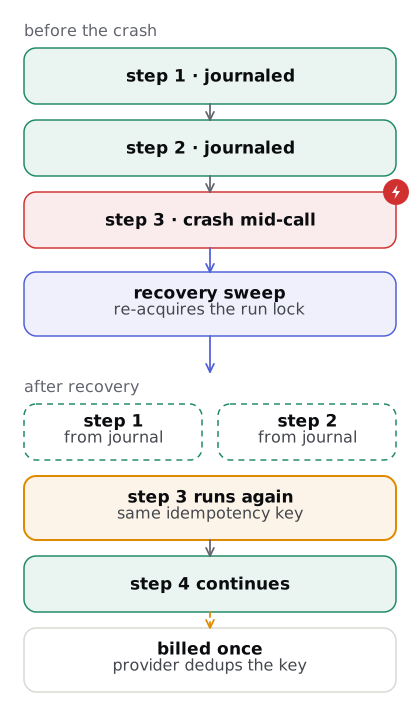
An agent takes input, works through steps (LLM calls, tool calls, API requests) and returns output. Every step is journaled, so a crashed run resumes where it stopped. This page covers creating, configuring, testing, running and scheduling agents.
Creating an agent
Section titled “Creating an agent”There are three ways to create an agent in the dashboard.
1. AI-assisted creation
Section titled “1. AI-assisted creation”Describe what you want the agent to do in plain English. PAL Runtime drafts the configuration, system prompt and tool selection for you.
Go to Agents > New Agent and select AI-assisted. Enter a description like:
Monitor my GitHub repositories for new issues labeled "bug",triage them by severity, and post a summary to Slack every morning.You review and edit the draft before anything is created.
2. Manual creation
Section titled “2. Manual creation”For full control, use the manual creation form and configure each field yourself:
- Name: a unique identifier (lowercase, hyphens allowed)
- Description: what this agent does (shown in the dashboard)
- System prompt: the instructions the LLM follows
- Model: the capability to use (for example
"auto"or"reasoning-large") - Connectors: which external services the agent can access
- Privacy level:
standard(encrypted at rest),private(end-to-end encrypted) oraudit(full audit trail)
3. From a template
Section titled “3. From a template”Pick a template in the dashboard and edit it. The CLI scaffolds from seven starters: basic, research, tool-use, connector, personal, scheduled and approval.
lantern init my-agent --template researchConfiguring an agent
Section titled “Configuring an agent”Instructions and system prompt
Section titled “Instructions and system prompt”The system prompt does most of the work. State the role, the steps and the failure behavior:
You are a research assistant. When given a topic:1. Generate 3-5 search queries2. Search the web for each query3. Read the top 3 results for each4. Synthesize findings into a structured report with citations
Always cite your sources. If you cannot find reliable information,say so rather than making things up.Model selection
Section titled “Model selection”Agents ask for a capability, not a vendor model. The model router maps it to a concrete model at call time:
"auto": PAL Runtime picks the best model for each step based on complexity and cost"reasoning-large": a large reasoning model"reasoning-small": a small, cheaper reasoning model"code-large"/"code-small": optimized for code generation"vision-large"/"vision-small": models that understand images
The agent’s model field
Section titled “The agent’s model field”Set model on the agent and every run, session turn and workflow ai-step without its own capability tries that model first. Pin a cheap model on a high-volume agent so it stays cheap; pin a stronger one where quality matters.
POST /v1/agents{ "name": "triage", "model": "fast" }
PATCH /v1/agents/triage{ "model": "reasoning-large" }      # "" or "auto" resets
GET /v1/agents/triage # → { ..., "model": "reasoning-large" }| Allowed value | Examples |
|---|---|
| Default | "", auto (today’s routing, unchanged) |
| Cost/speed target | fast, cheap, balanced, best |
| Capability | reasoning-frontier, reasoning-large, reasoning-small, chat-large, chat-small, chat-edge, vision-large, vision-small, code-large, code-small |
| Vendor model id | gpt-*, o1*, o3*, claude-* (lowercase, 100 characters or fewer) |
Anything else returns 400, including embedding, rerank and speech capabilities (agents run text completions). The error never repeats the value you sent.
Failover. The agent’s model goes first; on a 429, 402 or 5xx the router moves on:
- Cheap model (
fast,cheap,reasoning-small,chat-small, Haiku,*-mini): tries the other provider’s cheap tier, then fails. It never escalates to a Sonnet, gpt-4o or Opus class model, so a cheap agent can’t run up a bigger bill during an outage. - Any other model: the default chain follows, across providers.
- Provider not keyed for your tenant: the agent uses the default chain.
The model that answered is shown on the run’s llm:main step.
See Models for the full list of capabilities and how to configure providers.
Testing an agent
Section titled “Testing an agent”Every agent has a Chat tab in the dashboard (next to Build, Runs, Schedule and Settings). It lets you:
- Send test inputs and see streaming output in real time
- Inspect each step as it executes (timing, model used, tokens)
- View the full event stream and step trace on the Runs tab
From the CLI:
lantern runs create --agent my-agent \ --input '{"topic": "quantum computing"}' \ --streamRunning agents
Section titled “Running agents”Agents can be triggered in several ways:
- Dashboard: manual runs for testing
- CLI:
lantern runs create --agent <name> - REST API:
POST /v1/runs(withagentNamein the body) - Schedule: cron-based recurring runs
- Webhook: a signed request to a trigger URL. See Webhook triggers.
- Surfaces: messages on WhatsApp, Slack, Telegram or webchat. See Surfaces.
Scheduling agents
Section titled “Scheduling agents”Run an agent on a cron expression. See Scheduling.
Workflow tool nodes
Section titled “Workflow tool nodes”A tool node in a saved workflow graph really executes, or the step fails. There is no simulated success. Routing is by tool name:
| Tool | Runs |
|---|---|
web_search |
In the control plane, via the tenant’s Anthropic key (OpenAI search-preview as fallback). Its model spend is metered like an ai-step |
| Any other name | In the run’s microVM through the runtime-manager. The in-VM harness serves shell_exec, http_fetch, read_file, write_file, list_dir |
The step output is { "tool_name": ..., "result": ... } for sandbox tools. Failures are explicit; the step fails with an error such as:
tool runtime unavailable: "shell_exec" needs the microVM runtime and none is wiredtool "shell_exec": tool runtime unavailabletool runtime unavailable: "shell_exec": <detail from the manager>tool failed: "shell_exec": <detail from the tool>tool failed: web_search: <error>tool "shell_exec": ExecTool: <transport error> # manager unreachableThe first two mean no runtime-manager is reachable from the control plane (for example the stub scheduler in dev). The third is the manager reporting the tool unavailable for that VM; an ExecTool: error means the manager was configured but could not be reached. Only web_search works without a runtime.
Idempotency. Each sandbox tool call carries the key hex(sha256("runID|stepID|attempt")), so a crash-replay or retry of the same attempt dedups at the manager. Inside a loop the stepID includes the iteration and the body node path, <loopNodeId>[<i>]/<nodeId> (for example loop1[2]/search), so each iteration gets its own key.
Budgets. toolLimits on the agent’s budget (keyed by tool name, or connector.action for connector nodes) are checked before dispatch and counted after. A hard-fail budget fails the step with:
budget limit exceeded: tool "web_search" budget exhausted (50/50 today)See Budgets.
Agent lifecycle
Section titled “Agent lifecycle”Each agent run goes through these states:
- Queued: the run is waiting to be picked up
- Running: steps are actively executing
- Succeeded: all steps finished successfully
- Failed: a step failed after exhausting retries
- Cancelled: manually stopped by the user
A run that crashes mid-step is picked up by the recovery sweep (every 30 s by default, LANTERN_RECOVERY_INTERVAL). Workflow steps that already completed are skipped, not re-run.