Deployment
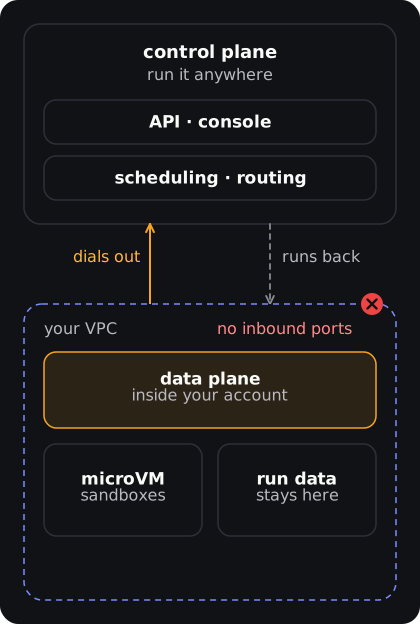
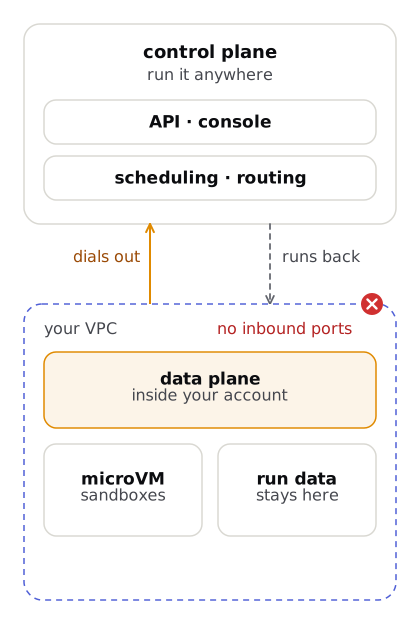
PAL splits into a control plane (scheduling, routing, dashboard) and a data plane (microVMs, execution, secrets). The data plane runs in your cloud: agent data never leaves your VPC.
The control plane decides what should run (dashboards, scheduling, budgets). The data plane is where agent code executes, with your API keys and your data. The split lets you keep execution inside your own cloud account, so prompts, credentials and customer data stay in your infrastructure wherever the control plane runs. Today you deploy both planes yourself: there is no managed cloud endpoint yet (see the API reference). The split is what makes a hosted control plane possible later without moving your data.
Architecture: the control plane / data plane split
Section titled “Architecture: the control plane / data plane split”The full system: channels, gateways, control plane, then your data plane. The control plane never runs user code.
What crosses the boundary: specs, identity and trace context go down; heartbeats, step events and audit come back. Token-authenticated (mTLS hardening planned). Prompts and data never leave your VPC.
Deployment options
Section titled “Deployment options”Fully managed (not offered yet)
Section titled “Fully managed (not offered yet)”Both planes hosted for you. This is the intended offering, not a shipped one: there is no managed cloud endpoint today, so you deploy the control plane yourself.
Hybrid (recommended for production)
Section titled “Hybrid (recommended for production)”Control plane in one place (your own platform account, or hosted for you once that exists); data plane in each workload’s cloud. Agent data stays in your VPC.
- Deploy the data plane Helm chart into your cluster (see below).
- Register via
POST /v1/data-planesor Settings > Data Planes. This mints a one-time 32-byte bootstrap token. Store it immediately. - The data plane dials out to
:50051(gRPC), sends the bootstrap token via theRegisterRPC, and receives a short-lived session JWT (1 h TTL, auto-rotated viaRefreshToken). - The data plane opens a persistent
RunStreambidi RPC. The control plane pushes run assignments; the agent reports status and completion back. Only run metadata crosses the boundary.
Tunnel RPCs
Section titled “Tunnel RPCs”Defined in packages/proto/lantern/v1/dataplane.proto, served on the control plane’s :50051 listener.
| RPC | Direction | Purpose |
|---|---|---|
Register |
agent to CP | Exchange bootstrap token for session JWT |
Heartbeat |
agent to CP | Liveness (every 30 s); learns drain orders |
ReportMetrics |
agent to CP | CPU / memory / active-run pressure (every 60 s) |
RefreshToken |
agent to CP | Rotate session JWT before 1 h expiry |
RunStream (bidi) |
agent and CP | CP pushes assignments; agent reports accepted / completed |
Fully self-hosted
Section titled “Fully self-hosted”Both planes in your infrastructure. Full control, full responsibility.
The repo ships one chart, infra/helm/lantern, with values-dev.yaml, values-staging.yaml and values-prod.yaml. It deploys the gateway, control plane, model router, workflow engine, runtime manager, runtime scheduler, surface gateway and dashboard, with in-cluster Postgres and S3-compatible storage for development and a Redis subchart. The chart defaults LANTERN_ENV=production, so the production startup guards are on.
helm install lantern ./infra/helm/lantern \ --namespace lantern --create-namespace \ --values infra/helm/lantern/values-prod.yamlTop-level values keys: global, gateway, controlPlane, modelRouter, workflowEngine, runtimeManager, runtimeScheduler, surfaceGateway, dashboard, postgresql, redis, minio, ingress, networkPolicy, backup, secrets, serviceAccount. There is no separate data-plane chart yet; for a data plane in another cloud, use the Terraform path below.
Production settings
Section titled “Production settings”- Autoscaling and disruption.
<component>.autoscaling.enabledadds a CPU-based HPA (needs metrics-server) for the control plane, gateway, model router, workflow engine and dashboard;values-prod.yamlturns it on. Components with more than one replica get a PodDisruptionBudget. - NetworkPolicy.
networkPolicy.enabled=truedenies all traffic in the release, then allows only the service-to-service flows the platform needs, DNS, and scrapes of/metricsfromnetworkPolicy.metricsFrom. Only the control plane, model router, workflow engine, runtime scheduler, runtime manager, surface gateway and backup job may leave the cluster; usenetworkPolicy.extraEgressfor managed Postgres or Redis on private IPs. Your CNI must enforce policy (Calico, Cilium). - Secrets you must supply.
secrets.jwtSecret,credentialKey,receiptSecret,grpcServiceToken,schedulerNodeToken,appDbPassword, and with managed storespostgresPasswordandminioPassword(the S3 secret key). The control plane also refuses to start in production without its gRPC TLS cert and the runtime-manager mTLS client cert; the chart cannot create these, so mount them withcontrolPlane.extraVolumesandextraEnv. - Backups.
backup.enabled=trueadds a CronJob that writes a gzippedpg_dumptos3://<backup.s3Bucket>/postgres/and prunes dumps older thanbackup.retentionDays. Prove a dump restores withscripts/db-restore-drill.sh <dump.sql.gz>; seedocs/runbooks/db-restore.md. This is a floor; managed Postgres with point-in-time recovery is the recommended production path.
In-cluster dependencies (dev) versus managed (prod)
Section titled “In-cluster dependencies (dev) versus managed (prod)”PAL needs Postgres with the pgvector extension, an S3-compatible object store and Redis. The chart can run them for you, which is what you want on kind or a laptop, but production should use managed services.
Postgres
- Dev / kind / evaluation (default):
postgresql.enabled=true: onepgvector/pgvectorStatefulSet with a PVC. Password issecrets.postgresPassword. - Production (
values-prod.yaml):postgresql.enabled=falseandexternalDatabase.host(plusport,sslmode). User and database names still come frompostgresql.auth. Provisionpgvectorand thelantern_approle yourself.
Object store
- Dev / kind / evaluation (default):
minio.enabled=true: one SeaweedFS StatefulSet with a PVC, one identity built fromminio.auth.rootUserandsecrets.minioPassword. Buckets inminio.defaultBucketsare created by a post-install Job. - Production:
minio.enabled=falseandexternalS3.endpoint,accessKeyId,bucketandregion(must match the bucket’s region); the secret key issecrets.minioPassword.
Redis
- Dev: Bitnami subchart (
redis.enabled). - Production: same subchart for now.
With the in-cluster stores off, helm template fails unless externalDatabase.host and externalS3.endpoint are set, so a production install cannot silently fall back to a single-pod database.
Terraform
Section titled “Terraform”lantern infra install --cloud aws|gcp|azure generates Terraform for a data-plane cluster. Flags include --tenant-id (required), --region, --cluster-name, --existing-cluster, --instance-type and --node-count. The modules live in infra/terraform/ and are not published to the Terraform Registry. Review the output, then apply.
lantern infra install --cloud aws --region us-east-1 --tenant-id <tenant-id> # generates terraform/ in the current directorycd terraformterraform initterraform planterraform applyNamespace isolation
Section titled “Namespace isolation”Each tenant gets its own Kubernetes namespace: lantern-t-<tenant_id>. This provides network isolation, per-tenant resource quotas, and separate service accounts and secrets.
Monitoring
Section titled “Monitoring”Every service emits OTel traces tagged with tenant_id, run_id, step_id, and agent_version. Compatible with Grafana + Tempo, Datadog, New Relic, Jaeger, and any OTel backend. The control plane also serves Prometheus metrics at :9464/metrics (its own listener, LANTERN_METRICS_ADDR, not the public :8080 API; HTTP request duration by status, run totals, budget blocks), unauthenticated, so scrape it only from inside the cluster. Alert rules and Grafana dashboards live in infra/monitoring/; runbooks in docs/runbooks/. See Observability for details.
Database migrations
Section titled “Database migrations”The control plane manages its Postgres schema via golang-migrate. Migrations are embedded SQL shipped inside the binary.
- Fresh databases. Migration
0001creates the full schema on first boot. - Existing databases.
0001is fullyIF NOT EXISTS; running it records version 1 inschema_migrationswith no DDL changes. - New changes. Sequential pairs (
0002_*.up.sql/0002_*.down.sql). Down migrations are required after the baseline.